
Are there any pre-requisites for this process?
Yes, you must ensure you have the document uploaded to the CRM and then you must ensure you have created a separate onboarding form.
In this example, we have already followed the steps in this guide here for setting up onboarding and the steps in this guide here to setup multiple.

How do I setup a document per onboarding form?
To setup a document to be included for candidate signing, you can follow the specific steps:
- Login to CentricFlow
- Browse to Settings > Your Compliance
- Locate the section named On-boarding Compliance Documents
- Click Add On-boarding Document, as shown below

- You can see the option above for Onboarding Form. The default setting is for this to be applied to ‘All Onboarding Forms’, but as you can see below, you are able to see the list of your forms to select.
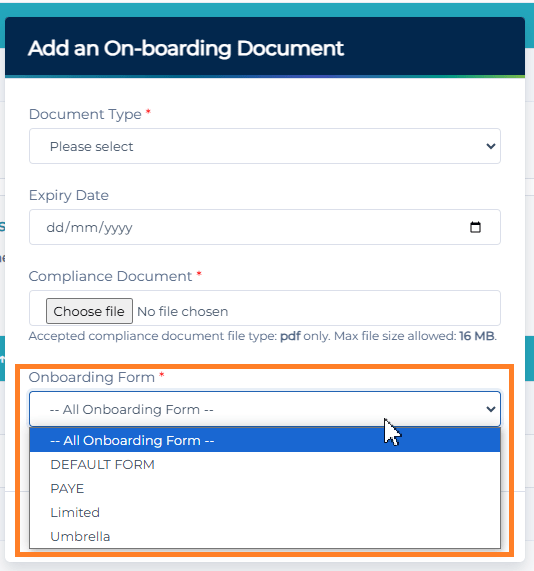
- Click Save.
To setup a document against an onboarding that already exists, you can follow the steps below:
- Login to CentricFlow
- Browse to Settings > Your Compliance
- Locate the section named On-boarding Compliance Documents
- Click on the Actions Menu.
- You will be able to update the document, to select which form this belongs to, as shown below.

- Click Update
Can I use the same document more than once?
No, you can only use a document to either be on a single onboarding form, or all of them.
Do you have an example of where we would use a document on a single form and once where we will use it across all forms?
Absolutely, you could, for example, ensure your GDPR policy is on all onboarding forms, so you know all registrants will sign this document. An example where you may only require a document to be part of one form could be where the candidate is an Umbrella candidate, so has differing terms from a PAYE candidate.
Additional Support
For any additional support or queries, please raise a ticket with our Customer Success Team on support@centricflow.co.uk or using the help button on the CRM.