

Release Notes: 05th May 2026
What’s Improved or Fixed
This section covers enhancements to existing features, performance optimizations, or user experience refinements.
- Shift Times
Shift times have now been added to the client timesheet portal, as shown below, enabling clients to gain visibility into the timesheet hours.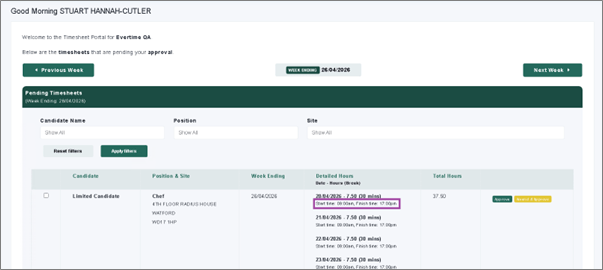
- Compliance Document Ordering
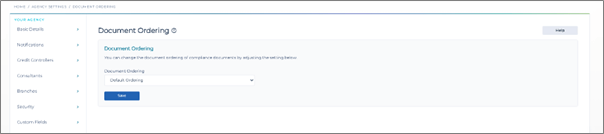
We have introduced an additional setting within the Agency Settings that allow you to determine the order you would like the compliance documents can be arranged within a Client and Candidate Record. Options include:
- Ordering by Name
- Ordering by Date Added
- Ordering by Expiry Date.
- Booking Notifications for Copy and Extend Bookings
We have updated the Booking Notifications to now send the Booking Assignment information when the Booking Copy and Booking Extension functionality has been used. The same notification triggered for the Add Booking is used for this.
- Data Export and Import Facility
We have introduced a new and improved facility for agencies to be able to extract their own data via the custom reports and also import this back in to the CRM to update existing data. The new facility includes the specification, blank templates and a sample file. This will allow for Candidates, Clients, Client Locations and Client Contacts to be managed with ease.
- Personal Public Service (PPS) number in the Republic of Ireland
We have added a validation rule to ensure that candidates that have been set to Ireland as their country, have a different validation rule to the National Insurance Number for the UK.
- Evertime Timesheet Status within CentricFlow
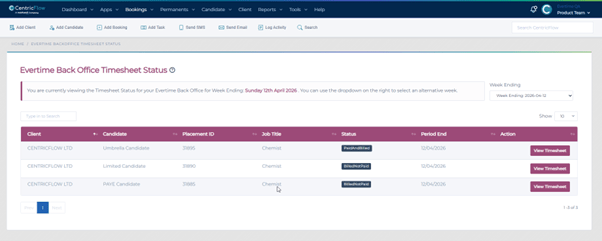
We have added additional functionality to for Evertime Customers, to enable the viewing of the timesheet status from Evertime. This will allow the agency to view these by the period ending date, up the last 4 weeks, and the current week and allow for being able to click through to Evertime to see the timesheet.
Additional Support
For any additional support or queries, please raise a ticket with our Customer Success Team on support@centricflow.co.uk or using the help button on the CRM.