
CentricFlow gives you the ability to send the Candidates a welcome email once they have been either manually added, accepted after on-boarding and if triggered manually.
You can set this up by following the steps below.
Before beginning, please ensure you have looked at the article: How to I setup our Emails within CentricFlow?
- Head to Account Settings (The menu by your name)
- Once you are on the Basic Settings, scroll down until you reach the section entitled Candidate Welcome Email, as shown below.
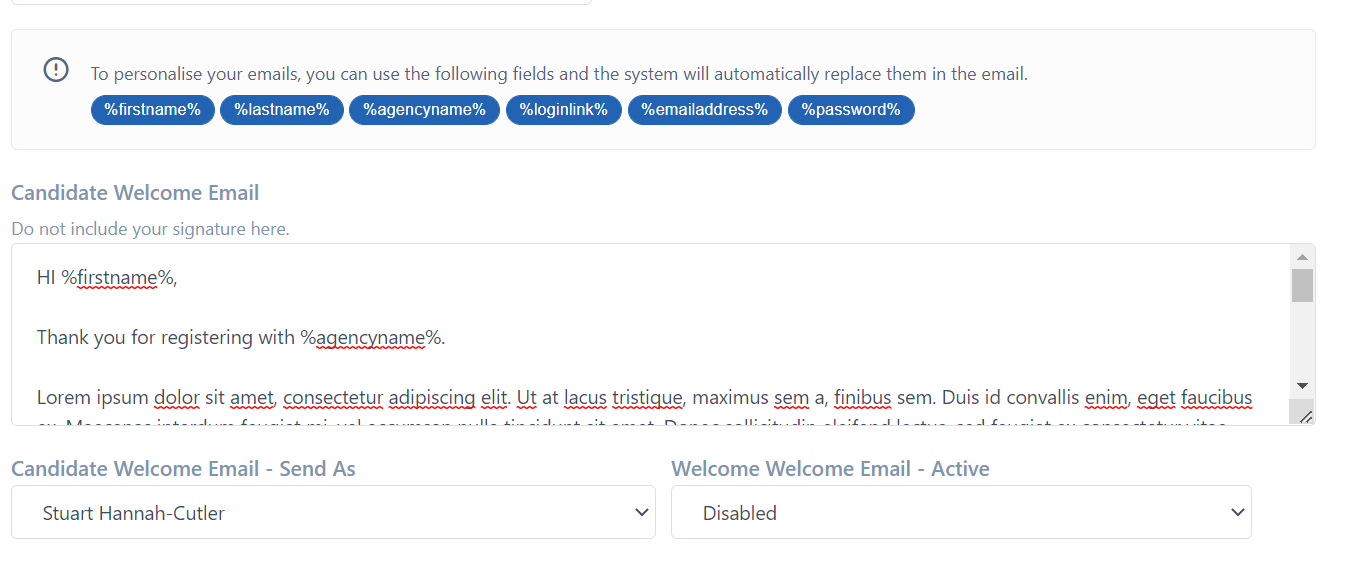
- Simply complete the body of the email you would like to send. You can click on the Click on the blue bittons and it will authmatically insert them.
- You do not need to add your email signature here, the system will use your signature you have already setup
Now the email is ready to be used, you need to select which email account the system will send this from and also switch it on, by enabling it.
If you require any further assistance, please get in touch with the CentricFlow Support team on support@centricflow.co.uk