
When you setup Idibu, and have this connected to CentricFlow, you will need to adjust the Application URL, which will allow for the applications to apply directly into CentricFlow.
To do this, firstly, you will need to obtain your onboarding link by following the steps below:
- Login to CentricFlow
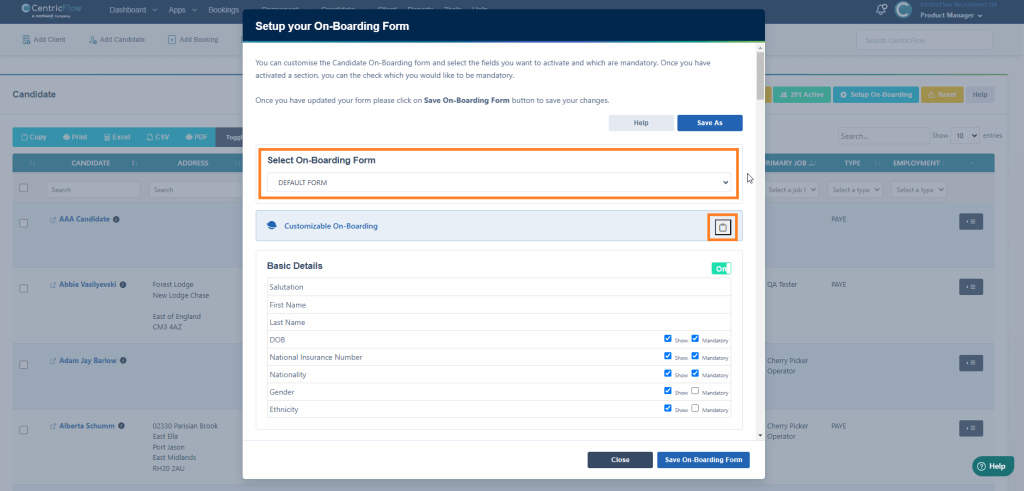
- Browse to Candidates > List Candidates
- Click on Setup On-Boarding

- Select the Onboarding Form you would like to use and then click on the clipboard.
To add this Application URL into Idibu, please follow the steps below:
1. Go to settings > system settings.

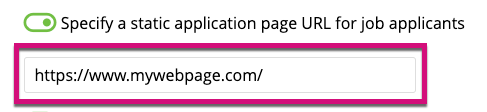
2. In the general tab, click the toggle switch next to ‘Specify a static application page URL for job applicants’.

3. Add your URL in the field that appears.
4. Click ‘Save Settings’ in the bottom right hand corner of the page.

5. A warning message will appear at the top of your browser. Click OK to proceed.

Further reading: https://v3-docs.idibu.com/article/881-adding-a-static-apply-url
Additional Support
For any additional support or queries, please raise a ticket with our Customer Success Team on support@centricflow.co.uk or using the help button on the CRM.