
What is DNU?
The DNU abbreviation means ‘Do Not Use’. This can be applied directly to a candidates profile, with comments about why the candidate is not to be used.
Why might a DNU candidate have availability?
There can be a number of reasons why a candidate would have availability and a DNU Flag:
- DNU Flag was introduced after the candidate has added availability.
- Candidate is still ‘Active’ on the CRM, so would still get availability reminders.
Tip: You can turn off these alerts by changing the candidates email preference or archiving them.
How do I see the DNU Flag on the dashboard?
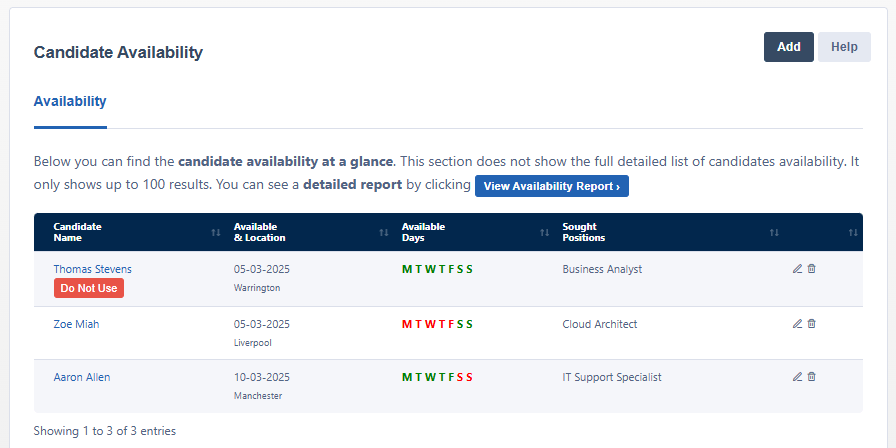
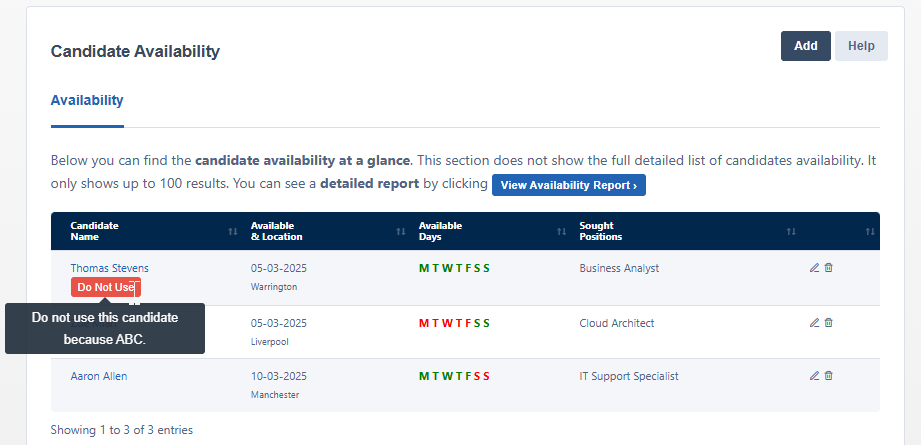
When the flag is present, you will see this as show in the example below. The first screenshot shows the flag and the second screenshot shows you how you can view the comments.
Additional Support
For any additional support or queries, please raise a ticket with our Customer Success Team on support@centricflow.co.uk or using the help button on the CRM.