
In short
Location Country tells Evertime Pay & Bill which country the work takes place in. The CRM takes it from the booking’s site address and sends it in the Combi CSV, in a new column called Location_Country. You don’t need to enter anything extra: just make sure each client site has the right country.
Summary
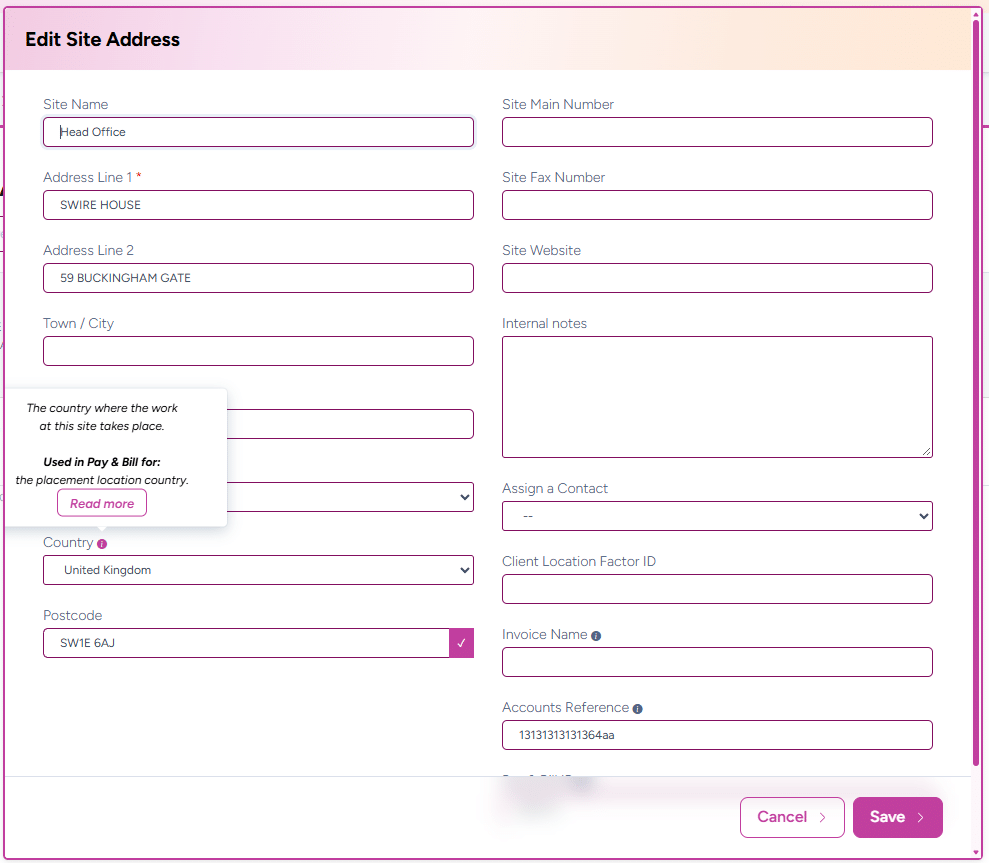
Every booking has one site, and every site address has a Country. When the booking is sent to Evertime Pay & Bill, that country is sent as the placement’s Location Country.
The CRM countries list now uses exactly the same country names as Pay & Bill, so every country you choose is one Pay & Bill recognises. To make this work, some country names in the CRM have changed and three countries have been added (see Country names that changed).
Where to find it
| What | Where |
|---|---|
| To set or change a site’s country | Client > Site Addresses > Add / Edit Site > Country |
| To see what is sent to Pay & Bill | Combi CSV > Location_Country column (between Invoice_AddPC and Inv_Email) |
| To see the country in Pay & Bill | The placement’s location country, after the Combi is imported |
When it applies
- To every booking sent to Evertime Pay & Bill, whatever the candidates’ worker types.
- To every line of the booking in the Combi CSV: the placement line, additional rates and booking rate cards all carry the same country.
- To existing sites: they keep their country. If its name changed, they show the new name automatically. Nothing needs to be re-entered.
How it integrates with Evertime Pay & Bill
- You choose the country on the client site’s address.
- You add a booking for that site and confirm it.
- The Combi CSV includes the country name in the Location_Country column, on every line for the booking. If the site has no country, the cell is left empty.
- When the Combi is imported into Pay & Bill, manually or by Auto-FTP, the placement’s location country is set to that name.
Pay & Bill matches the country by its exact name, including upper and lower case. Because the CRM list uses the Pay & Bill names, this happens automatically.
Country names that changed
29 countries have a new name so they match Pay & Bill exactly. Sites that used the old name now show the new one. You don’t need to do anything.
| Old CRM name | New name (Pay & Bill) |
|---|---|
| Bolivia | Bolivia, Plurinational State of |
| British Virgin Islands | Virgin Islands, British |
| Congo (Brazzaville) | Congo |
| Congo, (Kinshasa) | Congo, the Democratic Republic of the |
| Côte d’Ivoire | Cote d’Ivoire |
| Heard and Mcdonald Islands | Heard Island and McDonald Islands |
| Hong Kong, SAR China | Hong Kong |
| Korea (North) | Korea, Democratic People’s Republic of |
| Korea (South) | Korea, Republic of |
| Lao PDR | Lao People’s Democratic Republic |
| Libya | Libyan Arab Jamahiriya |
| Macao, SAR China | Macao |
| Macedonia, Republic of | North Macedonia |
| Moldova | Moldova, Republic of |
| Netherlands Antilles | Curaçao |
| Palestinian Territory | Palestinian Territory, Occupied |
| Réunion | Reunion !Réunion |
| Saint Helena | Saint Helena, Ascension and Tristan da Cunha |
| Saint Vincent and Grenadines | Saint Vincent and the Grenadines |
| Saint-Barthélemy | Saint Barthélemy |
| Saint-Martin (French part) | Saint Martin (French part) |
| Svalbard and Jan Mayen Islands | Svalbard and Jan Mayen |
| Syrian Arab Republic (Syria) | Syrian Arab Republic |
| Taiwan, Republic of China | Taiwan, Province of China |
| United States of America | United States |
| US Minor Outlying Islands | United States Minor Outlying Islands |
| Venezuela (Bolivarian Republic) | Venezuela, Bolivarian Republic of |
| Virgin Islands, US | Virgin Islands, U.S. |
| Wallis and Futuna Islands | Wallis and Futuna |
Three countries have been added to the list: Bonaire, Sint Eustatius and Saba; Great Britain; and Sint Maarten.
Netherlands Antilles no longer exists as a country, so sites that used it now show Curaçao.
Validation rules
| Rule | Details |
|---|---|
| Allowed values | Choose the country from the list. There is no free-text entry. Message: “Select a country.” |
| Optional | A site can be saved without a country. Location_Country is then sent empty. |
| Exact match | Every country in the list matches a Pay & Bill country name exactly, including upper and lower case. |
Examples
| Site country | Sent in Location_Country |
|---|
| Site country | Sent in Location_Country |
|---|---|
| United Kingdom | United Kingdom |
| Great Britain | Great Britain |
| Korea, Republic of (was Korea (South)) | Korea, Republic of |
| Curaçao (was Netherlands Antilles) | Curaçao |
| No country set | (empty) |
Frequently asked questions
A country name looks different from before. Why?
It was renamed to match Evertime Pay & Bill exactly. The country itself has not changed. See Country names that changed.
Should I choose United Kingdom or Great Britain?
Use United Kingdom for UK sites. Great Britain is also in the list because Pay & Bill has it, but United Kingdom is the one to use.
My site used Netherlands Antilles. What happened?
Netherlands Antilles no longer exists as a country. Sites that used it now show Curaçao. If a site is actually in Sint Maarten or Bonaire, Sint Eustatius and Saba, change it on Client > Sites.
Location Country is empty in Pay & Bill.
Check that the booking’s site has a country on Client > Sites, then check the booking was included in the latest Combi import.
Can a booking have more than one location country?
No. A booking has one site address, so it has one Location Country.